
Hyundai Tucson: IMS (Integrated Memory) / IMS Control Switch
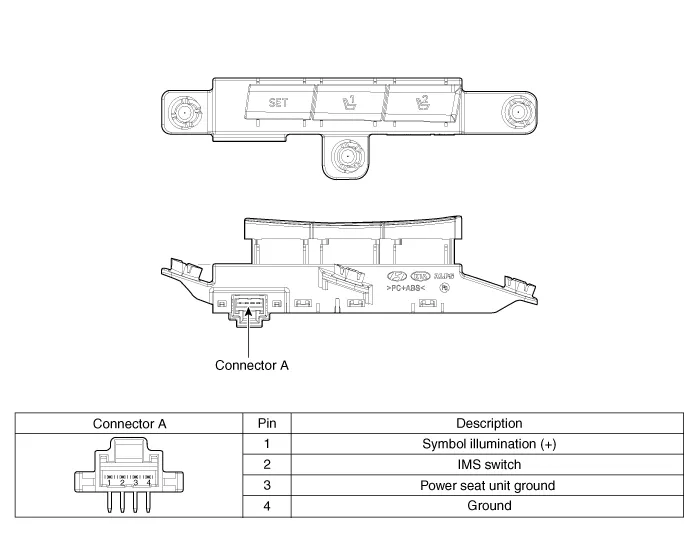
1.Disconnect the negative (-) battery terminal.
2.Remove the front door trim.(Refer to Body - "Front Door Trim")
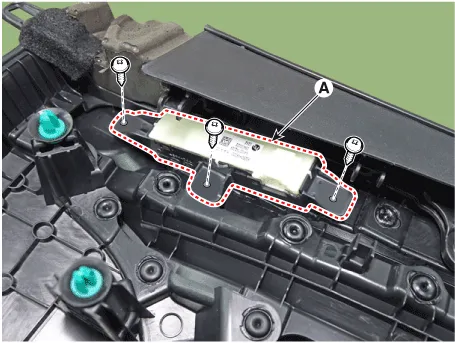
3. Remove the IMS switch (A) after loosening mounting screws.
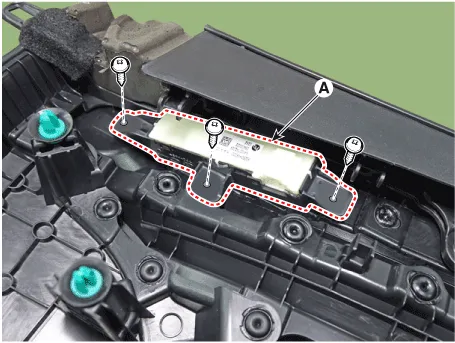
1.Install the IMS switch.
2.Reassemble the front door trim.
3.Connect the negative (-) battery terminal.
1.Disconnect the IMS control switch connector (A).
2.With the power IMS control switch in each position, make sure that continuity exists between the terminals below. If continuity is not as specified, replace the IMS control switch.
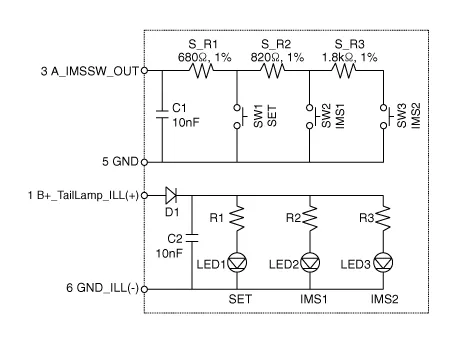
 IMS (Integrated Memory System) module
- Components
IMS input/output pin information
PinConnector AConnector BConnector C
1-B+ (Power)Seat slide motor switch (Forward)
2Seat recline motor (Forward)Ground (Power)Seat recline switch ...
 Fuel Filler Door
Components and Components Location
- Component Location
1. Fuel filler door release actuator
Fuel Filler Door Release Actuator
- Inspection
1.Disconnect the negative (-) battery terminal. ...
Other information:
Hyundai Tucson (NX4) 2022-2026 Owner's Manual: Blind-spot Collision-avoidance Assist (BCA)
Blind-Spot Collision-Avoidance Assist
uses the front view camera and the rear
corner radar to help detect approaching
vehicles in the driver’s blind spot areas
and warn you of a possible collision with
a warning message and audible warning.
If there is a collision risk when changing
l ...
Hyundai Tucson (NX4) 2022-2026 Owner's Manual: Lower Anchors and Tether for
Children (LATCH System)
The LATCH system connects a Child
Restraint System to the vehicle during
driving and in a collision. This system
is designed to make installation of the
Child Restraint System easier and reduce
the possibility of improperly installing
your Child Restraint System. The LATCH
system uses ...
