
Hyundai Tucson: Crash Pad / Crash Pad Under Cover

• When prying with a flat-tip screwdriver, wrap it with protective tape, and apply protective tape around the related parts, to prevent damage.
• Put on gloves to protect your hands.

• Take care not to bend or scratch the trim and panels.
1.Press the lock pin (B) and then remove the crash pad under cover (A).
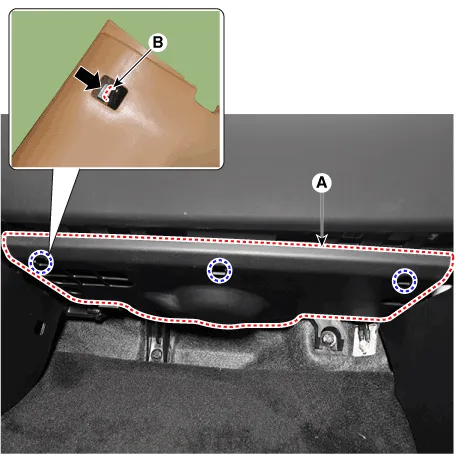
2.To install, reverse removal procedure.
 Crash Pad Side Cover
- Component Location
[LH]
1. Crash pad side cover [LH]
[RH]
1. Crash pad side cover [RH]
- Replacement
• When removing with a flat-tip screwdriver or remov ...
 Crash Pad Center Panel
- Component Location
1. Crash pad center panel
- Replacement
• When prying with a flat-tip screwdriver, wrap it with protective
tape, and apply protective tape aro ...
Other information:
Hyundai Tucson (NX4) 2022-2026 Service Manual: Evaporative Emission Control System
Description and Operation
- Description
Evaporative Emission Control System prevents fuel vapor stored in fuel
tank from vaporizing into the atmosphere. When the fuel evaporates in
the fuel tank, the vapor passes through vent hoses or tubes to the
canister filled with charcoal and the cani ...
Hyundai Tucson (NX4) 2022-2026 Owner's Manual: Headlight, Parking light, Turn
Signal light, Daytime Running
Light (DRL) Replacement
1 Headlight (Low)
2 Headlight (High)
3 Daytime Running Light (DRL)/
Parking light
4 Turn signal light
5 Front side marker
If the LED light does not operate, contact
an authorized HYUNDAI dealer for
replacement.
The LED light cannot be replaced as a
single unit. A skilled technici ...
